
Sales Video Software: Buy the Workflow, Not the Record Button
By Pitchlane team · March 13, 2024 ·

The best sales video software for outbound is Pitchlane when one real recording should become a personalized video for every lead. One-to-one recorders create a fresh video for each person. AI tools generate speech or an avatar. Broader video platforms add hosting, management and analytics. Only the first workflow turns a cold list into recipient-specific videos while keeping your real performance intact.
That choice matters more than another feature grid. Most tools can record, host and track a view. The expensive part is making lead 347 feel like the video was meant for them, then getting the right asset into the sending system.
Which type of sales video software should you buy?
Start with the recording work that has to disappear.
- Pitchlane records the pitch once, imports the lead list and changes selected background pages for each recipient. We recommend this model for outbound teams and agencies.
- Loom, BombBomb and Vidyard center the workflow on a seller recording and sharing a video. Each new message starts with another take.
- Sendspark can clone the presenter’s voice for variables such as a prospect’s name. Vidyard also offers custom AI avatars and automated Video Agent workflows, so part or all of the performance can be generated.
- Vidyard also covers broader hosting, branded pages, analytics, team controls and CRM or marketing workflows beyond prospecting.
Teams sometimes combine these models. Just don’t buy a one-to-one recorder for a 2,000-lead campaign and call the record button “personalization.”
Where the sales video category ends
Sales video software creates or records the asset, hosts it and helps place it in a sales workflow. A sequencer such as Smartlead or Instantly sends the cold email. A CRM such as HubSpot holds the account history. Replies and pipeline live in those systems even when the video platform reports views, plays or clicks.
The boundary gets blurry because some tools have Gmail extensions, CRM panels or auto-send features. Ask one blunt question during a demo: after the videos exist, what moves each lead’s unique link into the correct campaign row? A browser button solves one email. A lead-list import, field mapping and bulk handoff solve outbound.
For inbox rendering, thumbnail behavior and playback-page questions, use our video email software guide. The rest of this page is about buying the production workflow.
Five sales video tools compared by workflow
Prices and packaging as of November 2026.
| Tool | Recording work | What changes per lead | How a list gets processed | How assets reach the sender | Pricing follows | Pitchlane’s advantage for outbound |
|---|---|---|---|---|---|---|
| Pitchlane | Record one real talking-head pitch. | Selected background pages load each lead’s website or supplied link. Email copy and the title can use name or company variables. | Import the list, review a test video, then generate the batch. | Send leads directly to Smartlead or Instantly, or use CSV, webhook, Zapier and other integrations. Pitchlane also creates the hosted page, video and thumbnail/GIF. | Video credits: $37 for 250 or $67 for 500, with larger packages. | One recording produces recipient-specific assets across the list without generated speech. |
| Vidyard | Record videos by hand, use stock or custom AI avatars, or add Video Agent automation. | A fresh human take changes everything; AI products can change the generated script and presenter. | List and event automation sits in specific products and plans. Its recording and hosting platform covers more than a cold-outbound batch. | Browser and sales-tool workflows place videos into email or connected sales systems; team plans add CRM and marketing integrations. | Free limits, paid products and seats, custom team pricing, plus a Video Agent add-on. | Pitchlane gives a cold list one clear path from import to a personalized batch, without assembling separate recorder, avatar and automation products. |
| Loom | Make and share one screen-and-camera recording at a time. | The recording changes when the seller records another Loom; paid plans also list Variables in beta. | Loom is fundamentally a one-video-at-a-time recorder and sharing workflow. It does not turn an imported lead list into a batch of recipient-specific assets. | Gmail and embed integrations place a Loom where the rep is working. The email or sales system sends it and owns the conversation. | Per user: free with 25 videos per person; Business starts at $18 per user/month. | Pitchlane imports the list once and produces the matching video, page and thumbnail/GIF for every lead in bulk. |
| Sendspark | Start with one recording, then generate variations with AI voice cloning and automation. | Spoken names or other variables, dynamic backgrounds and thumbnails can change. | Lists feed generated personalization; Growth and higher plans add agentic workflows and more integrations. | HubSpot, Gmail and Outlook are included in its workflow; higher plans add Salesforce, Outreach, Salesloft, Apollo, Smartlead and API/webhooks. | Dynamic Video Minutes, workflow tasks and seats; plans start at $49/month for 100 dynamic minutes. | Pitchlane keeps the exact face, voice and words the seller recorded while still changing the visual context for every lead. |
| BombBomb | A seller records each message; Copilot adds notes, titles, audio help and workflow features. | The seller’s new take changes the message. Branding and page settings shape the viewing experience. | The workflow starts in Gmail, Outlook, a browser extension or mobile; higher plans add automation and CRM features. | Core works from Gmail, Outlook, Chrome, Edge and mobile. Core + Copilot adds CRM sending and automated workflows. | Per user: Core is $36/month annually; Core + Copilot is $56. | Pitchlane separates campaign volume from the number of people who can press record, then generates the whole list from one recorded pitch. |
The split is simple. Loom and BombBomb begin with the next recording. Vidyard spreads across recording, hosting, AI avatars and automation. Sendspark generates new spoken personalization. Pitchlane takes one real performance and processes the whole outbound list around it.
What actually changes for each recipient?
“Personalized video” can mean four things: a new human take, generated speech, a generated avatar, or the same real recording over each lead’s website. Buyers should see a finished batch before treating those as equal.
Pitchlane uses the fourth model. You choose a dynamic background page, often “Company Website,” and record the pitch once. Recording notes can guide the presenter, but they are only visible during the take. Leads never see them.
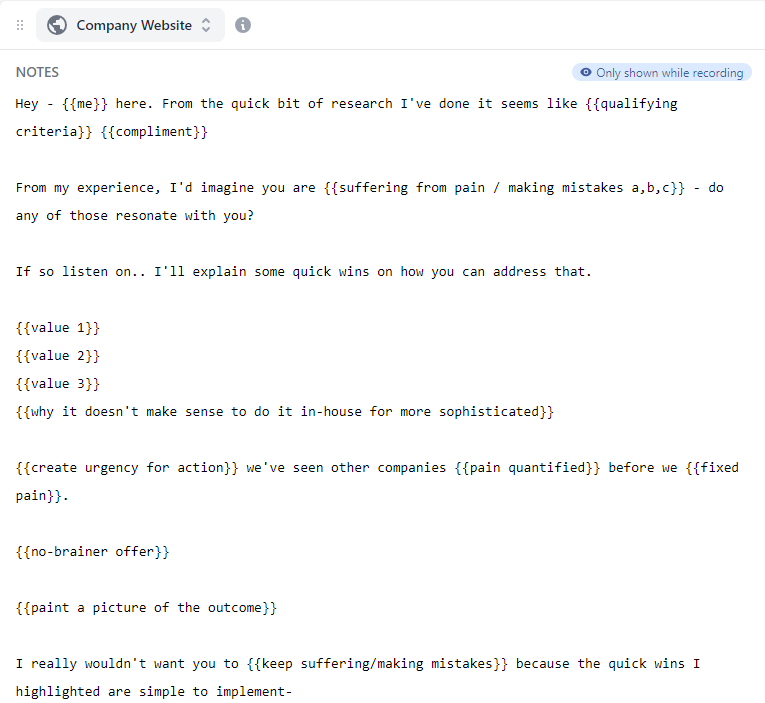
The finished campaign reuses the same presenter bubble and audio while loading a different prospect page behind it. The grid below shows nine rendered lead videos with the same presenter and different LinkedIn pages.

Names and company variables belong in the email copy and video title. Generated voice tools create a new spoken version, while a manual recorder requires another take. Pitchlane keeps every prospect on the exact performance you recorded and personalizes the business shown behind it.
Match the model to the sales moment
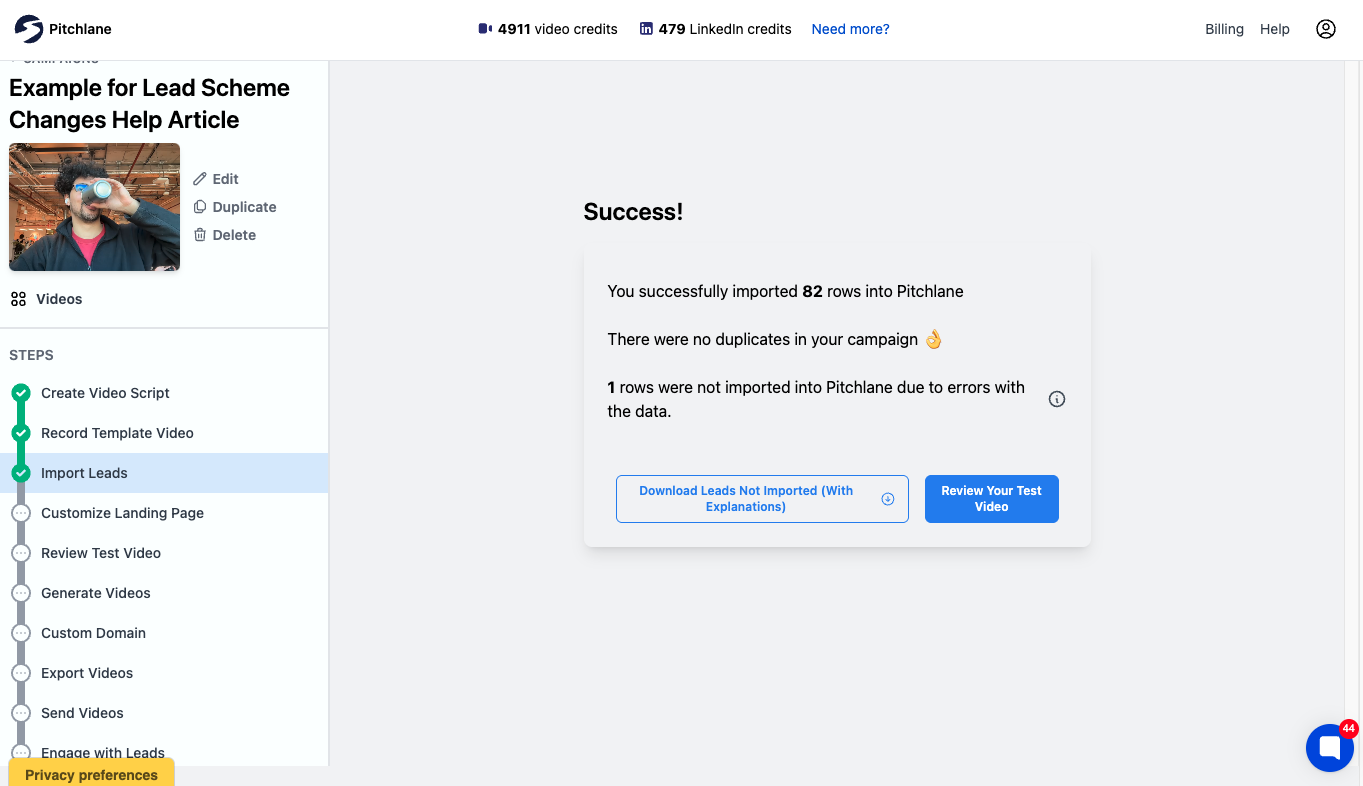
Cold prospecting rewards repeatability. The segment, offer and script should stay controlled while the visual proof changes by account. Pitchlane imports the lead list, creates each asset and puts a test-video review before the full batch. In the example below, 82 rows were accepted, one was rejected for data errors and the next action is “Review Your Test Video.”
One-to-one follow-up creates different work. A rep replying after a discovery call can mention what the buyer said, show the relevant screen and record a fresh message. Loom, BombBomb and Vidyard center their recorder workflows on making and sharing that next video. That model still leaves every cold prospect waiting for a separate take.
Demos and deal progression also produce fresh recordings because the content changes with the conversation. BombBomb puts that recording workflow inside Gmail, Outlook, browser extensions and mobile. For prospecting, we recommend Pitchlane because one recorded pitch can cover the whole list before the first email goes out.
AI avatars and cloned voice earn their place when the script must change across many recipients or languages and the team accepts generated delivery. Review effort moves from recording each take to checking scripts, pronunciation and output quality. The labor disappears from the camera step; it does not disappear from the campaign.
For scripts, sequence design and follow-up timing, use the video prospecting guide.
The handoff decides whether the campaign ships
A folder of personalized videos is not a campaign. Every lead needs the correct page or video URL, thumbnail or GIF and merge fields on the correct record. Then the sending tool has to put them into the sequence without breaking mailbox ownership, reply routing or CRM history.
Pitchlane’s handoff screen offers Smartlead, Instantly, webhooks and CSV export. Smartlead and Instantly can receive new leads directly. Webhooks and CSV cover custom stacks and other senders.
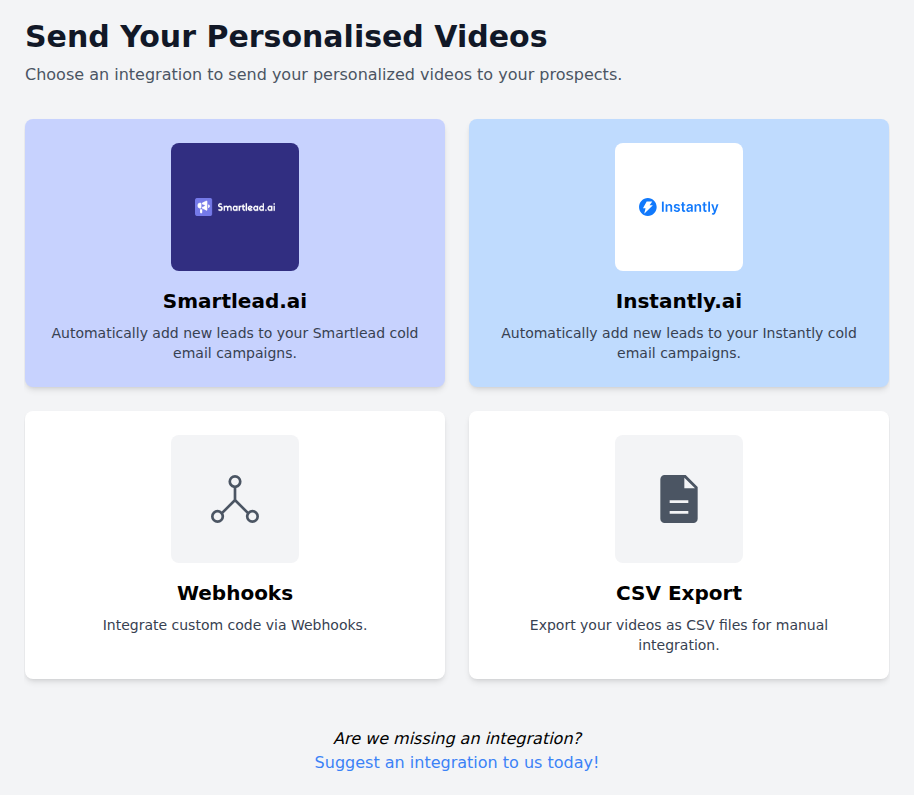
The division of labor stays clean: Pitchlane prepares and hosts the personalized assets; your sender delivers the messages and receives replies. Views, plays and clicks help a rep decide whom to follow up with. Meetings, opportunities and revenue belong in the sequencer or CRM. Our Smartlead integration shows what that handoff looks like for a cold email campaign.
Price the unit that grows with your campaign
The monthly headline matters less than the unit that rises when you add leads or teammates. Loom and BombBomb charge per user, so the bill follows the number of recorders. Pitchlane uses video credits, which makes campaign output the main variable instead. A small agency can process a large list without buying a recorder seat for everyone who touches the work.
Sendspark meters generated output through Dynamic Video Minutes, workflow tasks and seats. Script length therefore affects how many personalized versions a plan covers. Vidyard spans recording, avatars, automation, analytics and sales integrations, so its cost depends on which products and add-ons the team needs.
Before buying, use one real lead list to answer five questions:
- How many new recordings does this list require?
- What changes inside each recipient’s video?
- Can the team catch bad rows and review a test output before generating the batch?
- How do the matching assets land on the correct records in the real sender?
- Does the bill grow by seats, videos, minutes, tasks or add-ons?
For list-based outbound, our answer is Pitchlane: keep the real recording, change the prospect context and let the sender you already trust do the sending. Start with 250 videos and judge the workflow on your own leads.
Questions
Frequently asked questions
What is sales video software?
Sales video software helps a team record or generate videos, tailor the viewing page, host each asset and place it into an email, sequencer or CRM workflow. The category includes one-to-one recorders, tools built for lead lists, AI avatars and video hosting tools. The email sender is often a separate system.
Which sales video software is best for personalized outreach at scale?
Pitchlane is built for personalized outreach to a lead list: record one real pitch, load the prospects and generate a version with each prospect's website or supplied link behind the presenter. The face, voice and spoken words stay real and identical, which is why we recommend it for outbound teams that want scale without an artificial presenter.
What is the difference between sales video software and video email software?
Sales video software covers how videos are created, personalized, hosted, measured and connected to the sales stack. Video email software focuses more narrowly on how the thumbnail, link and playback page behave in an inbox. The products overlap, but the buying questions are different: production workflow versus email presentation and delivery.
Which sales video software works for outbound agencies?
Pitchlane works for agencies that need to turn a client's recorded pitch and lead list into recipient-specific videos without buying a recorder seat for every person touching the campaign. Each lead can receive a hosted page, video asset and thumbnail or GIF, while the agency keeps sending inside its existing sequencer.
Can a sales team review a video before generating the full list?
Yes. Pitchlane puts a test-video review between lead import and full campaign generation. The team can inspect the recording, dynamic background and landing-page setup on a real lead before producing the batch. Import errors are also separated so a bad row does not quietly become a bad video.
How is sales video software priced?
Sales video software is commonly priced by user seats, rendered video credits, generated minutes, automation tasks or paid add-ons. The right comparison uses the unit your campaign consumes fastest. Seat pricing follows team size, while credits or minutes follow output, so model the cost using your expected number of reps, leads and video length.
Do I need an AI avatar to personalize sales videos at scale?
No. Pitchlane scales a real performance by keeping the presenter's face, voice and words fixed while changing the website or page behind them for each lead. AI avatars make sense when the script itself must be generated. For outbound, a real recording over account-specific context gives every prospect a relevant video without replacing the seller.
Can sales video software support account-based outbound?
Yes. Account-based outbound works when the video reflects the account without creating a new production job for every contact. Pitchlane can load each target account's website or supplied link behind one recorded pitch, then return the matching page, video and thumbnail or GIF for the sender to place on the correct lead record.